Minimal launcher for AndroidYour phone works for you now.Not the other way around.
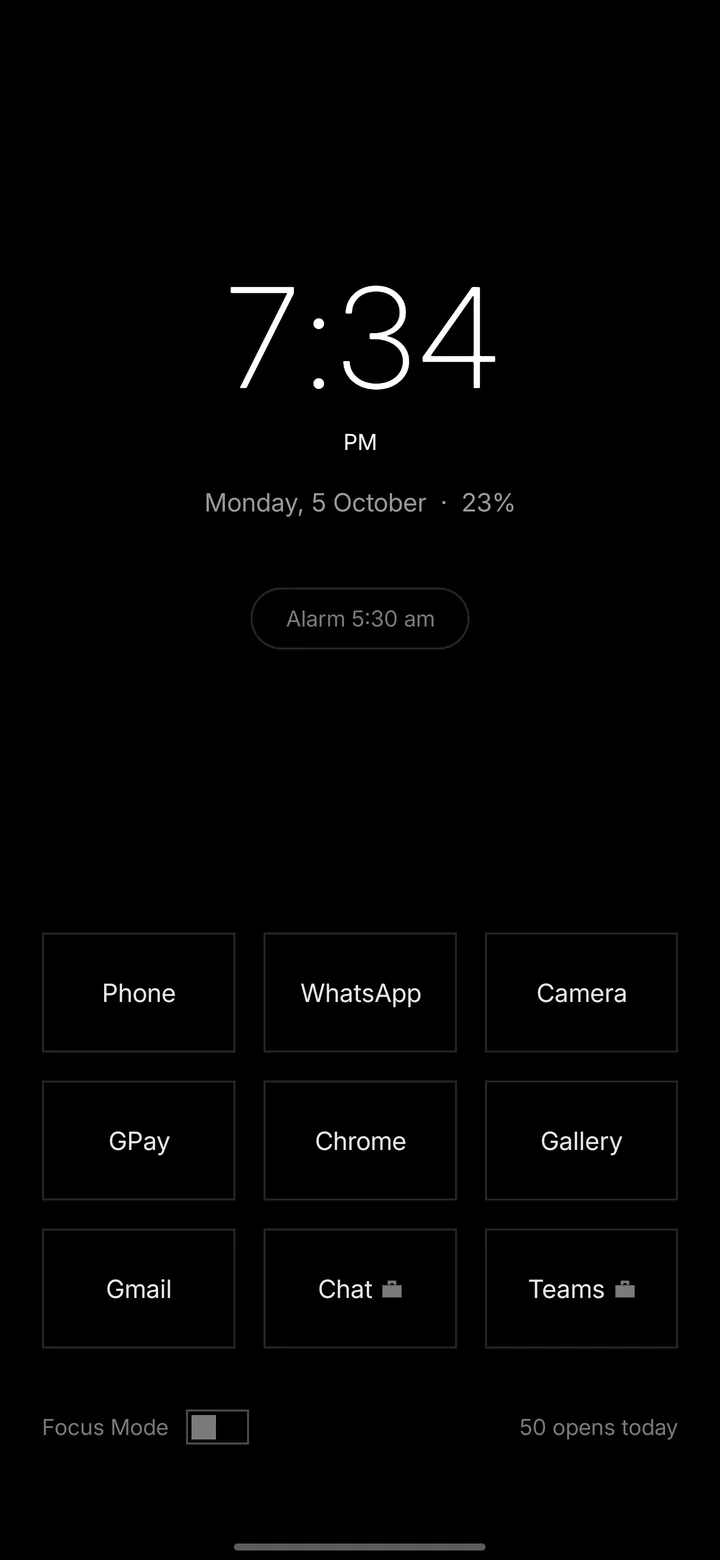
No icons. No wallpaper. No color. No feed. Your home screen is a short list of words on a black page, and nothing on it was put there to catch your eye.
It also has no internet permission. Android will not let it open a network connection at all. Not we promise not to. It cannot.
Monday, 5 October
Not a screenshot. That is the real time, and your battery.
The whole idea
The most distracting screen on your phone is the one you look at most.
You see your home screen more than any other screen you own. Every color, badge and widget on it is a small request for your attention, and most of them get answered before you have decided anything.
Same phone. Same apps. Same two seconds to open any of them.
Keep scrolling
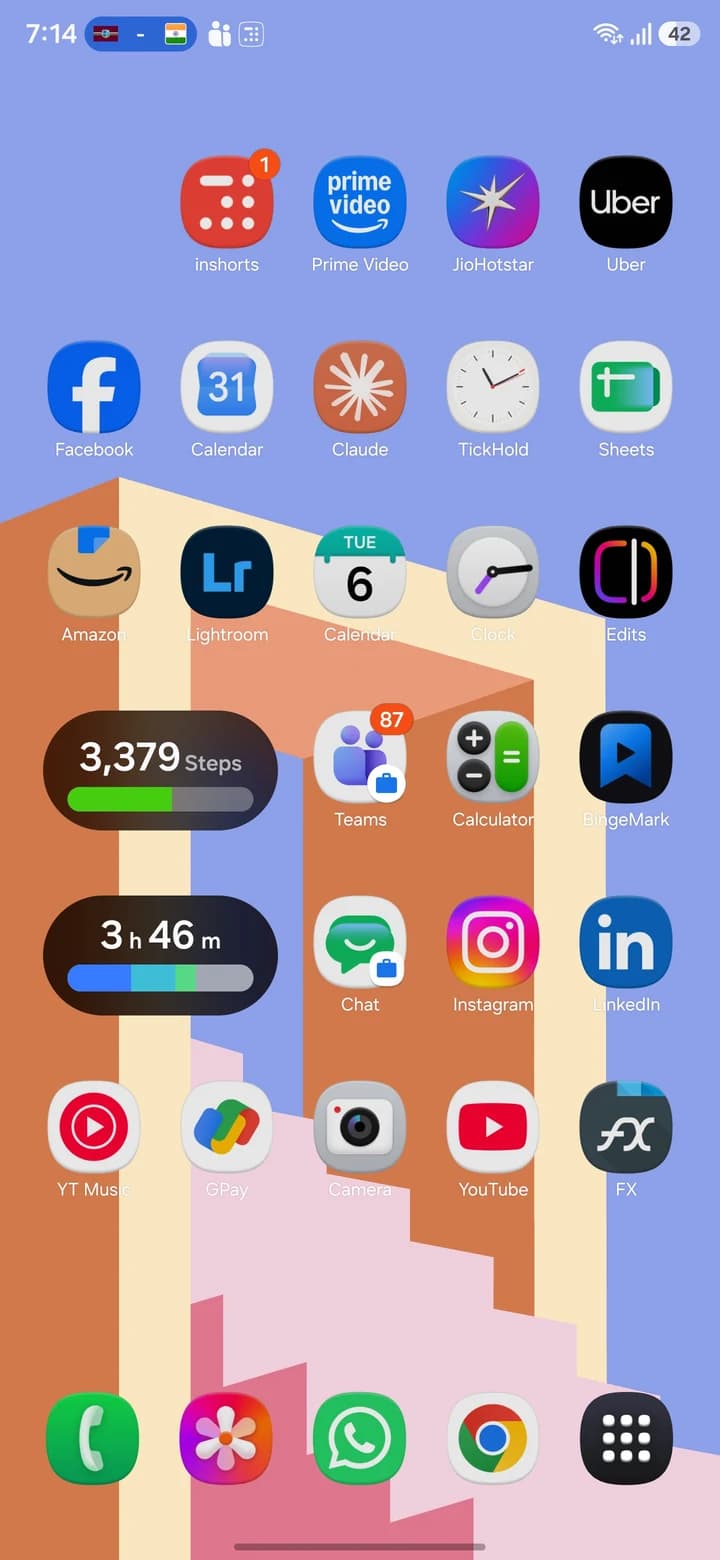
Why a home screen with nothing on it
You do not decideforty times a day.
Unlit removes the trigger, not the app. Instagram is still installed and still two seconds away. But you have to want it by name, and that one requirement is the difference between a decision and a reflex.
You open Instagram because the icon is in the same place it has always been, and your thumb knows the way without asking you.
Researchers call this a checking habit: a brief, repetitive look at the phone, usually under thirty seconds. The defining feature is that it is automatically triggered. You are not choosing.
A colored icon in a fixed grid position is close to a perfect trigger. Always in the same place, visually louder than everything around it, and reaching it takes no thought at all.
What we can and cannot claim
The research on breaking habits by removing their cues is strong, but it studied life changes like moving house, not app icons. Nobody has run a controlled trial on monochrome launchers. What we can say is that the mechanism is well understood: when the cue is gone, the automatic response has nothing to fire at.
Oulasvirta, Rattenbury, Ma & Raita, Personal and Ubiquitous Computing, 2012. A large share of all phone use is nothing but these brief, automatic checks.
Dekker & Baumgartner, Mobile Media & Communication, 2023. Screen time fell from 287 to 268 minutes a day. Honest catch: the number of unlocks did not change at all.
Stothart, Mitchum & Yehnert, Journal of Experimental Psychology, 2015. Receiving one degraded performance on the task at hand without being answered.
Everything it does
Small app. Long list.
Monday, 5 October
01. The home screen
Nine apps, as words
Pick the apps you actually use. They appear as plain text, in a grid of cards or a list of names. Everything else is one swipe away.
Monday, 5 October
- Grid of cards or a single column of names
- Left, center or right alignment
- Text size in five steps
- Drag to reorder, with the gap following the card
- Rename anything to what you actually call it
A home screen you have to scan is a home screen you linger on. Nine is enough for the apps you open daily and too few to park the ones you are avoiding.
02. The clock
The largest thing on the screen
A drawn analog face, a digital clock, or nothing at all. It sets the tone of the whole launcher, so it gets the most control.
Monday, 5 October
- Analog, digital or none
- Four sizes, three weights, optional second hand
- 12 or 24 hour, or follow the phone
- Date line in nine formats
- Battery percentage beside the date
- Next alarm, shown within a window you choose
The most common reason to check a phone at night is to confirm the alarm is set. Putting the next alarm on the home screen removes a reason to unlock.
03. Notifications
A count, not a feed
One line above your apps. Two messages, one missed call, four more. No icons, no senders, no previews, no red dots.
Monday, 5 October
- Counts by category, never reads the text
- No title, body, sender or app name is ever stored
- Three numbers held in memory, nothing written to disk
- Turn it off entirely
A notification you have not even answered still costs you attention on whatever you were doing. A count tells you whether something needs you. A preview pulls you in. The difference between those two is the whole design.
04. Focus Mode
A session you can always leave
Choose the handful of apps you want reachable and start. Everything else waits. Focus can put the phone on Do Not Disturb using your own priority exceptions.
Monday, 5 October
- Sessions of 15, 25, 30, 45 or 60 minutes
- Strict mode makes leaving harder, never impossible
- An entry screen, so starting is a deliberate act
- Bedtime and Focus hours, so it turns itself on
- Leaving is one tap, with no lecture
Every blocker that cannot be escaped gets uninstalled, usually in week one. A session you can leave is a session you will start again tomorrow, and over a month that is the only thing that matters.
05. Appearance
Light or dark, and little else
No wallpapers, no icon packs, no accent colors. The only decisions are the ones that change how it reads.
Monday, 5 October
- Dark, light or follow the phone
- Animations: none, minimal or smooth
- Haptics on or off
- Hide the status bar and navigation bar
- One tap to Android's grayscale setting
Switching the phone to grayscale cut daily screen time by about 19 minutes in a 2023 study, from 287 to 268. Unlit cannot gray your whole phone, no app can, but it takes you straight to the Android setting that does.
06. All apps
A search box, not a grid
The keyboard opens with the list. Type two or three letters and if one app matches, it opens. No tap needed.
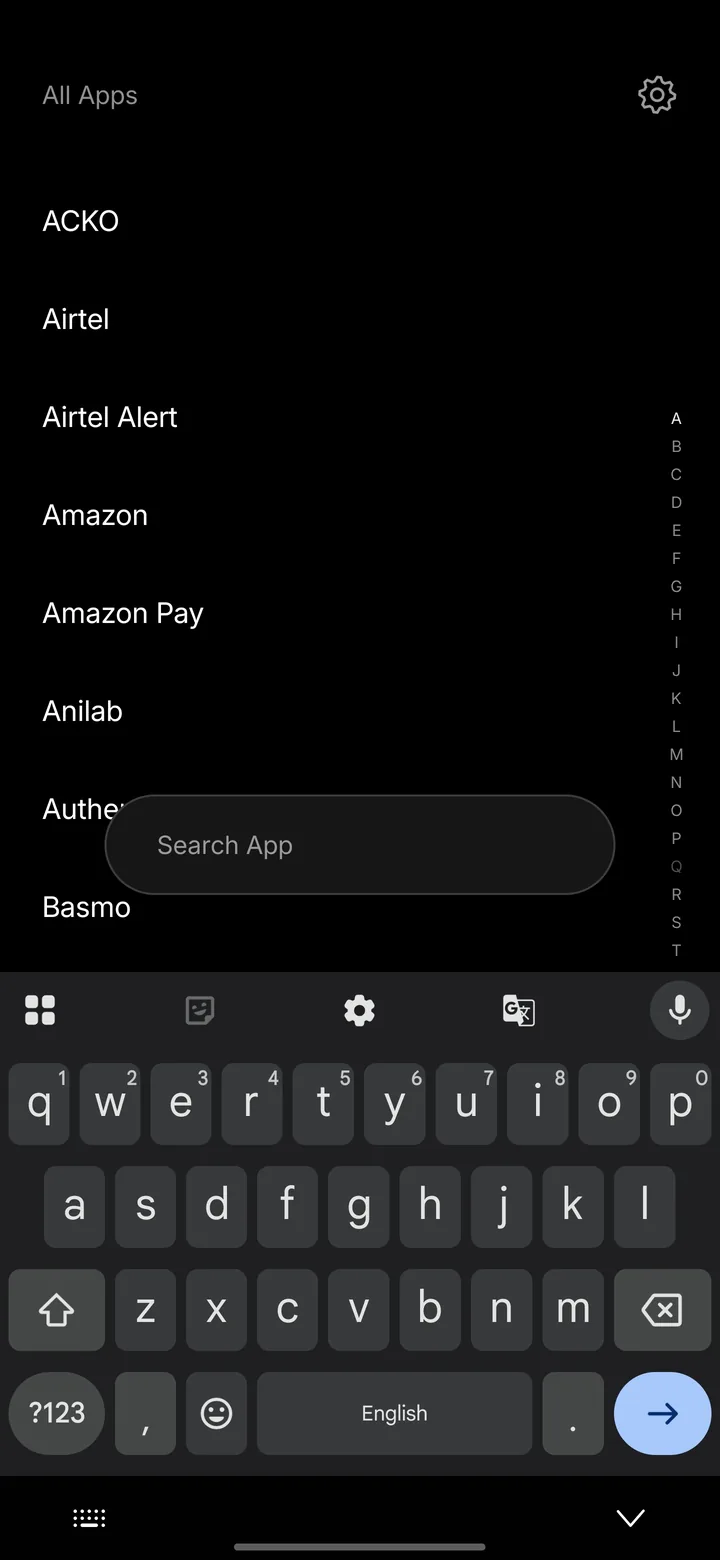
- Plain alphabetical list with an A to Z index
- Hide apps you never open, without uninstalling them
- Rename anything, across the whole list
- Work profile apps badged and kept separate
- Uninstall from a long press
This is the feature that makes a text launcher faster than icons rather than slower. Once you have it, hunting a grid feels slow.
07. Gestures
Six gestures, all yours
Swipe up for all apps, swipe down for the shade, double tap to lock, long press for settings. Left and right are unassigned until you decide.
Gestures
BINDINGS
- Swipe upApp list
- Swipe downNotification shade
- Swipe leftNothing
- Swipe rightApp list
- Double tapLock the screen
- Long pressUnlit settings
NOTE
Swipes work anywhere on the home screen, including over the app cards.
The notification shade and quick settings have no public API. They work on most phones and quietly do nothing on a few OEM skins.
Lock the screen needs one permission, granted by you in Android's Accessibility settings. It turns the screen off and nothing else, so your fingerprint and face unlock keep working.
- Eight actions to bind: app list, search, shade, quick settings, settings, lock, open an app, or nothing
- Swipes work anywhere, including over the app cards
- Fingerprint and face unlock keep working
- Every gesture can be switched off
Double tap to lock needs one permission because Android gives apps no other way to turn the screen off. Unlit's service declares no event types and cannot read your screen. It can lock, and nothing else.
08. App rules
Friction, per app
For the apps you open without meaning to. A count, a pause, a typed phrase, a daily limit, or a cool-down between visits.
Chess
You have opened this once today.
4
- Show how many times you have opened it today
- A pause of 3 to 30 seconds, with a countdown
- Type a phrase to continue, in your own words
- A daily limit of 5, 10 or 20 opens
- A cool-down of 5 to 60 minutes
- Overrides counted and shown, never blocked
A limit you can break is honest about who is in charge. A limit you cannot break is a fight you will eventually win by deleting the app. So overrides are always available, and always counted.
09. Since Unlit
Did any of this help?
Android kept a record of your screen time before you had ever heard of this app. Unlit reads it and shows your average day before, against every week since.
Since Unlit
36m less a day
Across 23 days that is about 13h 48m you spent somewhere other than a screen.
AVERAGE DAY
NUMBERS
HOW THIS IS CALCULATED
Before Unlit is your average daily foreground time over the 26 days Android had on record before you installed it. Every figure is read on this phone and kept here.
- Waits a full week before reporting, because weekends and weekdays differ
- Captures the baseline in the first days, while Android still has it
- Today's opens, and how many times you changed your mind
- Every figure read on your phone and kept there
It shows its working, every number explained. And when your screen time goes up it says so plainly, because a wellbeing screen that only ever delivers good news is one nobody believes twice.
Privacy, as a missing permission
It cannot talkto the internet.
Unlit does not request the internet permission. Android therefore will not let it open a network connection at all. Not a policy, a missing permission. You can check it yourself in the app's permission list in about thirty seconds.
What it asks for, all optional
- Notification access
- Counts unread messages for the home screen line. Counts only.
- Usage access
- Reads Android's own screen time record for Since Unlit.
- Do Not Disturb
- Lets a Focus session silence the phone, using your own exceptions.
- Lock the screen
- One accessibility action. No event types, cannot read the screen.
Never requested
The internet. Unlit does not declare that permission, so Android will not let it open a network connection even if it tried. That is why nothing any of the permissions above read can leave this phone: there is nowhere for it to go.
No accounts, no analytics, no trackers, no advertising, no crash reporter.
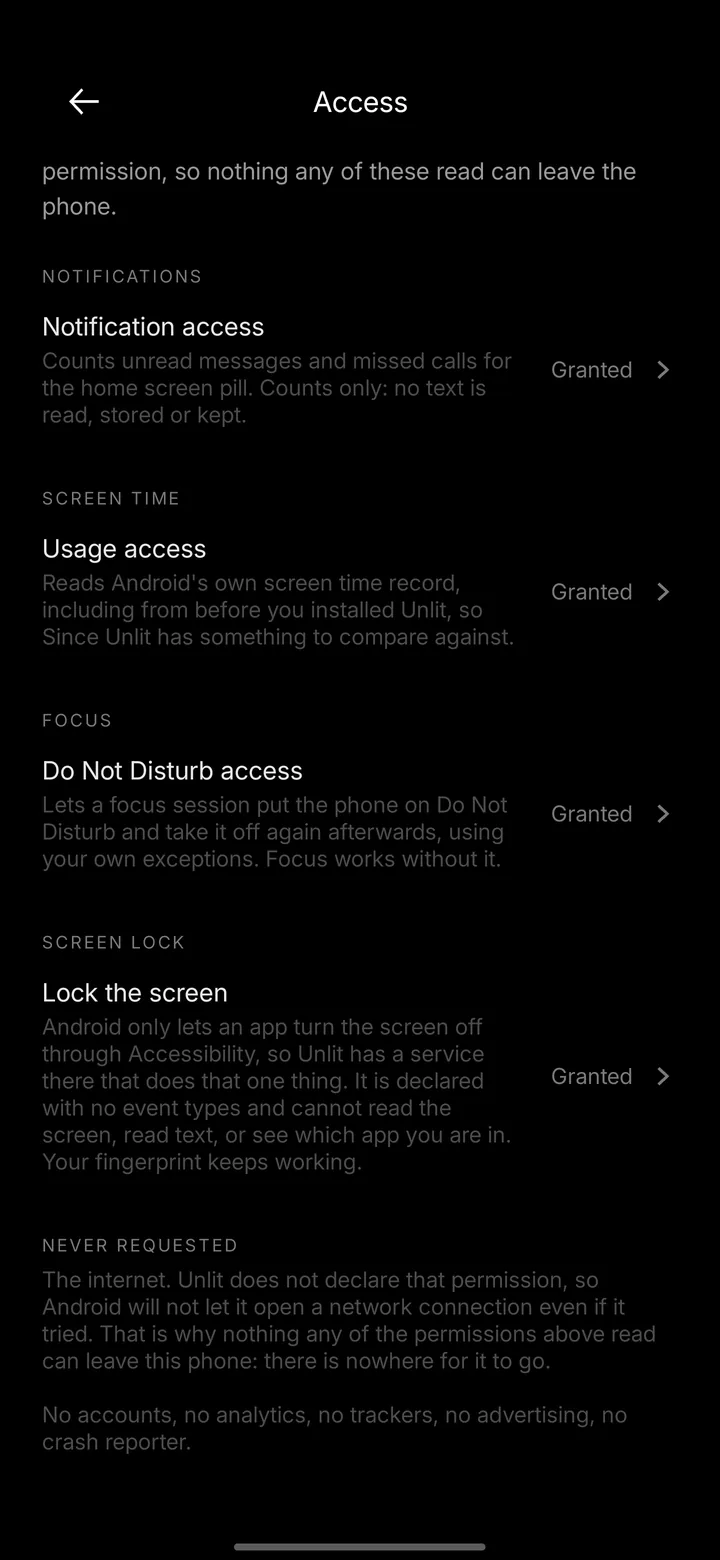
This screen is in the app. You can check it yourself.
One honest number
Nineteen minutes.
And no fewer pickups.
In a two week study of 84 Android users, switching the phone to grayscale cut daily screen time from 287 minutes to 268. Real, measured, and smaller than the internet will tell you.
Here is the part usually left out. The number of times people picked up their phone did not change at all. Grayscale makes sessions shorter, not reaching for the phone rarer. It did not improve sleep or productivity either.
Dekker & Baumgartner, Mobile Media & Communication, 2023. Unlit cannot gray your whole phone, no app can, but it puts the Android setting that does one tap away.
Minutes of screen time a day
Times the phone was picked up
Questions
Including the
awkward ones.
If something here talks you out of installing it, that is the answer doing its job. A launcher is not a thing to be talked into.
Is Unlit free?
Yes, completely, with no ads and no paid tier. Everything in the app is available to everyone.
Does Unlit collect my data?
No, and it is worth being precise about why. The app does not request the internet permission, so Android will not let it open a network connection at all. There is no mechanism by which data could leave your phone, whatever anyone's intentions. No accounts, no analytics, no crash reporting, no advertising code.
Can I go back to my old launcher?
Yes, any time, in about ten seconds. Unlit has a setting that takes you straight to Android's default home app screen, where you pick your old launcher again. Nothing is locked and nothing is lost.
Why does it need accessibility permission?
Only for the double tap to lock gesture. Android gives apps no other way to lock the screen without throwing away your fingerprint unlock. Unlit's accessibility service declares no event types, so the system sends it nothing, and it cannot read your screen. It can perform one action, which is lock. The gesture is off until you turn it on.
Will it drain my battery?
No. There is no background syncing, no location, no network and no widgets refreshing. A text-only home screen is about the least demanding thing a launcher can be.
Will I lose my widgets?
Yes. Unlit does not support widgets, and that is deliberate rather than unfinished. A widget is a live feed on your home screen, which is the thing Unlit exists to remove. If widgets are essential to you, Unlit is the wrong launcher and that is a fair reason to pass.
Does it work on Samsung?
Yes, and on One UI it works with Samsung's own gesture navigation. Unlit runs on Android 8 and above.
Does hiding an app delete it?
No. A hidden app is still installed and still works. It just does not appear in your app list, so you do not see it when you are looking for something else.
Does grayscale actually reduce screen time?
Somewhat, and less than people claim. In a 2023 study, switching to grayscale cut daily screen time by around 19 minutes, from 287 to 268. But the number of times people picked up their phone did not change. It makes sessions shorter, not pickups rarer. It also did not improve sleep or productivity.
Is there an iPhone version?
No. iOS does not allow third party launchers, so this is not something that can be built.
Can I use it with icon packs?
No. There are no icons to pack.
How do I uninstall it?
Set a different default home app first, then uninstall Unlit like any other app. Setting the home app first means you are never left without a home screen.
From here, the phonewaits for you.
Free, with no ads and no paid tier. Takes about a minute to set up, and about ten seconds to undo if you decide it is not for you.
Android 8 and above